
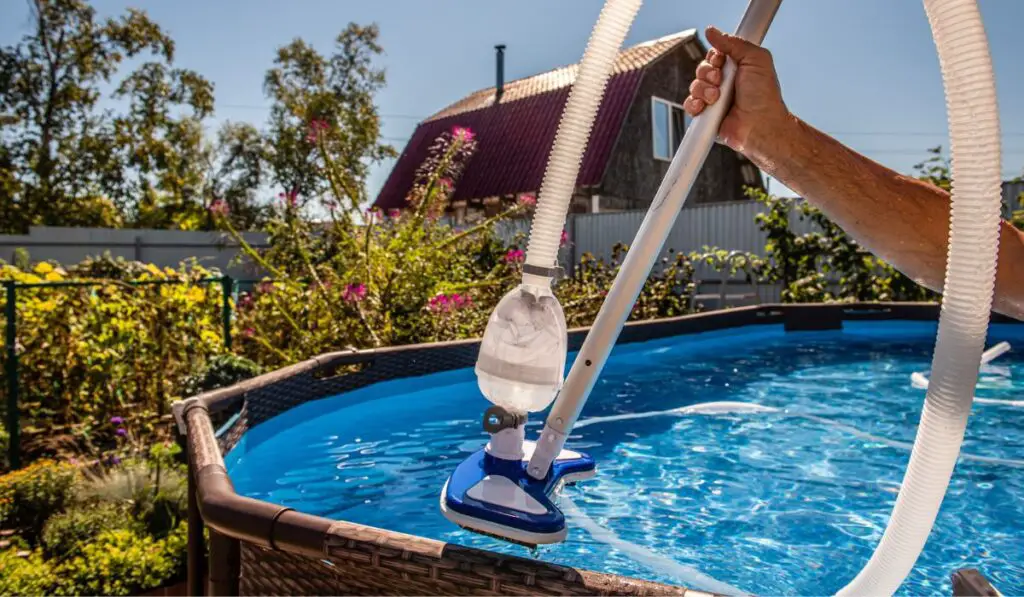
To vacuum an above-ground swimming pool, connect a vacuum head to a telescoping pole and pool hose, prime the hose, attach it to the skimmer or suction port, and move the vacuum slowly across the pool floor. Use the filter setting for normal dirt and the waste setting when removing heavy debris or algae, if your system supports it.
Vacuuming once a week is a useful starting point for many U.S. pool owners. You may need to vacuum more often after storms, heavy use, nearby lawn work, or algae growth. Always follow your pool pump and filter manual because valve names and connection points vary by model.
Introduction
An above-ground pool can collect sand, leaves, dust, sunscreen, and other debris on its floor. A pool skimmer removes floating debris, but it cannot remove dirt that has already settled. Vacuuming sends that dirt out of the pool or into the filter system.
This guide covers manual pool vacuuming for common above-ground pools in the United States. It also explains which pump setting to use, how to avoid losing suction, and what to do when the vacuum does not work.

What You Need Before You Start
Gather the right tools before connecting the vacuum. Most above-ground pool vacuum systems use the same basic parts:
- A manual pool vacuum head
- A telescoping pool pole
- A flexible vacuum hose
- A skimmer vacuum plate, also called a vacuum plate or skim-vac
- A clean skimmer basket
- A pool brush or leaf net
- Water test strips or a test kit
- Access to your pump and filter valve
Some pools use a dedicated suction port instead of a skimmer plate. If your pool has a built-in suction port, use the connection method listed in the pool manual.
Check the pool water level
Keep the water level high enough for the skimmer to work. In many pools, water should sit around the middle of the skimmer opening. If the water drops too low, the pump can draw in air and lose its prime.
Do not vacuum if the pump is pulling air through the skimmer. Add water first if needed.
Clean the skimmer and pump baskets
Turn off the pump before opening a basket. Remove leaves and large debris from the skimmer basket and pump basket.
A full basket reduces water flow. It can also make the vacuum lose suction. Never reach into a moving pump or place your hand near a suction opening while the pump is running.
Remove large debris first
Use a leaf net to remove sticks, leaves, toys, and other large objects. A vacuum head is made for fine dirt and small debris. Large objects can clog the hose, skimmer, or pump basket.
Check the filter
A dirty filter can reduce suction. Clean or backwash the filter according to the filter maker’s instructions before vacuuming.
- Sand filter: Backwash and rinse when the pressure reading reaches the level stated in the manual.
- Cartridge filter: Turn off the pump, remove the cartridge, and clean it as directed.
- Diatomaceous earth filter: Follow the filter maker’s instructions for backwashing and replacing the proper amount of DE.

Which Pump Setting Should You Use?
The correct setting depends on the amount and type of debris in the pool and on your filter system.
| Pool condition | Common setting | What happens |
|---|---|---|
| Light dust or small dirt | Filter | Water passes through the filter and returns to the pool |
| Small amount of settled debris | Filter | Dirt is captured by the filter |
| Heavy dirt, algae, or fine silt | Waste, if available | Water and debris leave the pool |
| Cartridge filter system | Usually Filter | Most cartridge systems do not have a waste setting |
| Unsure of the valve position | Check the manual | Valve layouts and labels vary |
The filter setting saves water and works well for ordinary cleaning. The waste setting can remove dirty water from the pool, but it lowers the water level. You may need to add fresh water during or after vacuuming.
Never move a multiport valve while the pump is running. Turn off the pump first, move the valve, and then restart the pump.
When should you vacuum to waste?
Use waste only when the debris load is too large for the filter or when the pool has fine material that you do not want to send through the filter. Examples include:
- Heavy algae or dead algae
- A large amount of dirt after a storm
- Fine sediment that quickly clouds the pool
- Debris that returns through the pool jets after filtering
Vacuuming to waste is not ideal for light cleaning because it removes pool water. If your pool uses a cartridge filter, do not assume that “waste” is available. Use only the settings and plumbing supported by that system.

How to Vacuum an Above-Ground Pool Step by Step
Follow these steps for a standard manual pool vacuum.
1. Brush the pool walls and floor
Brush the walls, corners, steps, and floor before vacuuming. This loosens dirt and moves it toward the bottom.
If the pool contains algae, brushing alone will not solve the problem. Test and balance the water, then follow the product label or pool-care plan for algae treatment. Vacuum the dead material after it settles.
2. Assemble the vacuum
Connect the vacuum head to the telescoping pole. Push one end of the vacuum hose onto the vacuum head.
Make sure the connection is snug. A loose hose can let air into the system and reduce suction.
3. Fill the hose with water
The hose must be full of water before it connects to the skimmer. Air in the hose can cause the pump to lose prime.
Use one of these methods:
- Place the vacuum head on the pool floor.
- Hold the free end of the hose in front of a return jet.
- Let water flow through the hose until bubbles stop coming from the vacuum head.
- Keep the hose end underwater while moving it to the skimmer.
You can also submerge the entire hose slowly, starting at the vacuum head, until the hose fills with water.
Do not lift the filled hose out of the water while moving it to the skimmer.
4. Connect the hose to the skimmer
Turn off the pump before opening the skimmer or changing a connection.
For a common skimmer-plate setup:
- Remove the skimmer basket.
- Place the vacuum plate over the basket, if your plate is designed for that position.
- Connect the filled hose to the plate.
- Make sure the hose stays underwater.
- Restart the pump.
Some systems require the hose to connect directly to the skimmer suction port. Use the pool maker’s instructions if the connection differs.
5. Set the pump to filter or waste
Choose filter for normal dirt. Choose waste only when your equipment supports it and you want the debris and water to leave the pool.
If using waste, place the discharge hose where it can safely drain. Keep expelled water away from your home’s foundation, nearby pools, septic systems, and areas that could flood. Follow local water-disposal rules when they apply.
6. Move the vacuum slowly
Place the vacuum head flat on the pool floor. Move it in slow, overlapping lines.
A slow pace keeps dirt from becoming a cloud. If you move too fast, the vacuum may push debris away before it can collect it.
Work from the shallow end toward the deeper area when practical. Pay extra attention to:
- Corners
- Wall-to-floor seams
- Under ladders
- Around steps
- Areas below return jets
- Spots where dirt gathers after circulation
Avoid lifting the vacuum head off the floor while the pump is running. Lifting it can introduce air into the hose.
7. Watch the water level and suction
Stop if the water falls below the safe skimmer level. Add water before continuing.
Also stop if:
- The pump begins to make a loud rattling or sucking sound
- Bubbles come from the return jets
- The vacuum loses suction
- The pump basket is no longer full of water
- The filter pressure rises beyond the maker’s recommended range
These signs can point to air in the system, a clogged basket, a blocked hose, or a dirty filter.
8. Finish and restore the system
When the floor is clean:
- Turn off the pump.
- Remove the vacuum hose from the skimmer.
- Remove the vacuum head from the pool.
- Empty the skimmer and pump baskets.
- Return the valve to the normal operating setting.
- Restart the pump.
- Check the return flow and water level.
- Rinse, drain, and store the hose and vacuum head.
If you used the waste setting, replace the lost water. Test the water after circulation resumes.
How to Vacuum Without Losing Suction
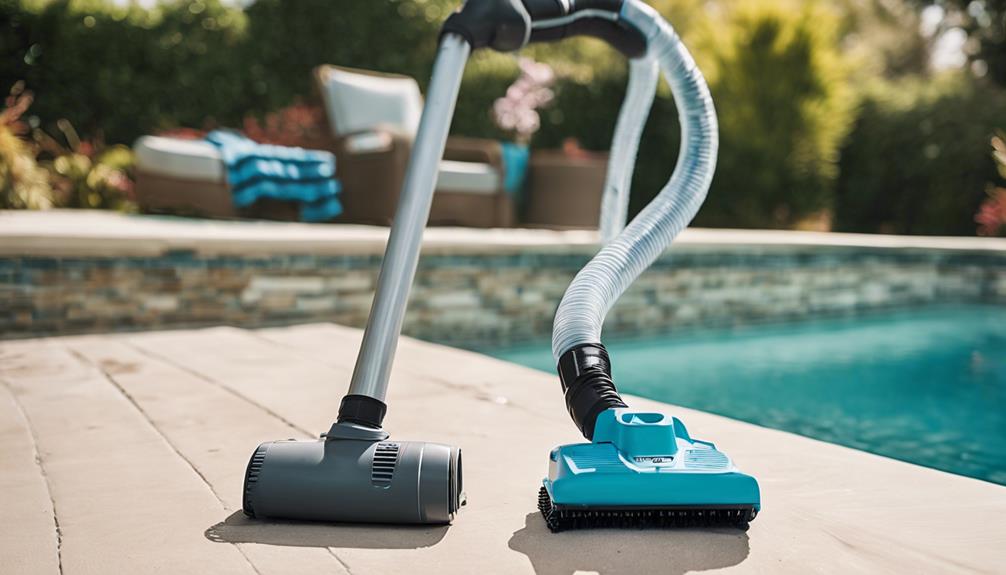
The most common cause of weak suction is air. The vacuum hose, skimmer connection, and pump basket must remain filled with water.
Use this quick check:
- Confirm the water level is high enough.
- Make sure the hose is fully underwater.
- Check that the hose is not cracked or kinked.
- Inspect the hose connection at the vacuum head.
- Clean the skimmer basket.
- Clean the pump basket.
- Check the filter pressure.
- Confirm that valves are in the correct position.
- Look for bubbles at the return jets.
If the pump loses prime, turn it off. Do not let the pump run dry. Follow the pump manual to restore prime before continuing.
A small crack in a vacuum hose may draw in air even when the hose appears connected. Hold sections of the hose underwater and look for bubbles if you suspect damage.
Vacuuming With a Cartridge Filter
Most cartridge filter systems send vacuumed water through the cartridge and back into the pool. This means the cartridge catches the dirt.
Use these precautions:
- Start with a clean cartridge.
- Vacuum slowly.
- Watch the filter pressure.
- Stop if the pressure reaches the cleaning point listed in the manual.
- Turn off the pump before removing the cartridge.
- Rinse the cartridge with a suitable hose spray.
- Replace a damaged or worn cartridge.
Do not remove the cartridge while the pump is running. Do not use a stronger cleaning method than the cartridge maker allows. High pressure or harsh chemicals can damage filter fabric.
Cartridge filters may need cleaning after vacuuming heavy debris. If the pool is very dirty, remove large debris with a leaf net first to reduce the load on the cartridge.

Vacuuming With a Sand or DE Filter
Sand and DE filters often use a multiport valve with settings such as Filter, Backwash, Rinse, and Waste. The exact order and procedure differ by system.
For normal vacuuming, use Filter. For heavy dirt, Waste may be useful if the valve and plumbing include it.
After vacuuming:
- Use the filter maker’s backwash procedure when required.
- Use the rinse setting only as directed.
- Restore the valve to Filter before normal circulation.
- Add DE after backwashing if your DE filter manual requires it.
- Check the pool water level after using Waste.
Never guess the backwash or rinse sequence. A wrong valve setting can send water in the wrong direction or damage equipment.

What to Do If the Vacuum Does Not Work
Use the symptom to narrow down the cause.
The vacuum has no suction
Possible causes include:
- Air trapped in the hose
- A low water level
- A loose skimmer connection
- A blocked hose
- A full skimmer basket
- A dirty filter
- A valve in the wrong position
- A pump that has lost prime
Fill the hose again, check the baskets, and confirm the valve position. If the pump still will not prime, turn it off and consult the pump manual.
The pump loses prime during vacuuming
The hose may contain air, or the skimmer may be drawing air because the water is too low. A cracked hose or loose fitting can cause the same problem.
Stop the pump. Raise the water level if needed. Refill the hose and reconnect it underwater.
Dirt comes back through the return jets
The filter may be overloaded, damaged, or unsuitable for the amount of debris in the pool. A sand filter may also need backwashing, while a cartridge filter may need cleaning.
If fine dirt continues to return, stop vacuuming and inspect the filter according to its manual. Do not keep running the pump if the filter is damaged.
The pool becomes cloudy
Cloudy water can result from stirred-up fine dirt, poor filtration, unbalanced water, or algae. Allow the pool to circulate and retest the water.
Vacuuming does not replace water testing. Check sanitizer and pH with a reliable test kit or take a water sample to a pool store for testing.
The vacuum head floats
A floating head often has air trapped inside it. Submerge the head and tilt it slightly until the air escapes. Make sure the head is compatible with the pole and hose.

How Often Should You Vacuum an Above-Ground Pool?
Vacuum when dirt is visible on the floor or when the pool needs more cleaning after weather or heavy use. Many owners start with once a week and adjust from there.
Vacuum more often when:
- Trees surround the pool
- Wind carries dust into the water
- Swimmers use the pool often
- Pets enter the pool area
- The pool is near grass or unpaved ground
- Algae or cloudy water develops
- The pool cover was removed after a long period
Skim the surface often, brush the walls weekly, and keep the filter running for the time recommended by the equipment maker. Good circulation reduces how much dirt settles on the floor.

Safety Rules for Pool Vacuuming
Follow these basic rules every time:
- Turn off the pump before changing a valve or opening a basket.
- Keep electrical devices away from wet areas.
- Use equipment with the proper GFCI protection required by the product instructions and local electrical rules.
- Never block or cover a pool suction outlet.
- Keep children and pets away from the pool while hoses and equipment are in use.
- Do not vacuum during lightning or severe weather.
- Never run the pump dry.
- Keep the water level high enough for safe skimmer operation.
- Use pool chemicals only as directed on the label.
- Do not mix pool chemicals.
- Store chemicals and equipment away from children and animals.
If a pump, cord, outlet, or pool suction fitting looks damaged, stop using it and contact a qualified pool or electrical professional.

Key Takeaways
- Remove large debris with a leaf net before vacuuming.
- Fill the vacuum hose with water to prevent air from entering the pump.
- Use Filter for light dirt and Waste only when your system supports it.
- Move the vacuum head slowly in overlapping lines.
- Watch the water level, filter pressure, and pump sound.
- Turn off the pump before changing valve settings or opening baskets.
- Clean the filter after heavy vacuuming.
- Test the water if the pool remains cloudy or develops algae.
Frequently Asked Questions
Can I vacuum an above-ground pool without a skimmer?
Yes. Some manual vacuums connect to a dedicated suction port, while battery-powered or rechargeable pool vacuums collect debris in their own filter bag. A vacuum that does not connect to the pump can be useful when the pool’s filtration system has weak suction or when you want to avoid sending debris through the main filter.
Should the pump be on when vacuuming?
The pump usually needs to run while a suction vacuum is in use. Turn the pump off before connecting the hose, changing a valve, opening a basket, or disconnecting equipment. Follow the vacuum and pump manuals for the exact sequence.
Can I vacuum an above-ground pool on the waste setting?
Use Waste only if your filter system has that setting and the manual allows vacuuming through it. Waste sends pool water and debris out of the system, so the water level will fall. Do not use this setting on a system that does not support it.
Why does my pool vacuum keep losing suction?
Air in the hose is the most common reason. A low water level, clogged basket, dirty filter, blocked hose, cracked hose, or loose connection can also reduce suction. Refill the hose, check the baskets, inspect the hose, and confirm the valve setting.
How long should I run the pump after vacuuming?
Run the pump long enough to circulate the water and clear any remaining fine particles. The exact time depends on pool size, filter size, water condition, and the pump maker’s guidance. Check the water clarity and filter pressure rather than relying on one fixed time.
Conclusion
Vacuuming an above–ground pool is simple when the hose is full of water, the filter system is ready, and the correct valve setting is used. Remove large debris first, vacuum at a slow pace, and stop if the pump loses prime or the water level drops too low.
After cleaning, restore the normal filter setting, inspect the baskets, and test the water if it looks cloudy or shows signs of algae. For equipment that will not prime, leaks, or damaged electrical parts, use the manufacturer’s manual or contact a qualified pool professional.

One Comment