A Dyson vacuum brush that is not spinning is often blocked by hair, has lost power, or is not fully connected. Turn the vacuum off, unplug it or remove it from the charger, and clear the brush bar before checking filters, attachments, and battery power.
The exact fix depends on the Dyson model. A cordless V-series vacuum, an upright vacuum, and a cylinder vacuum may use different brush heads and warning lights. Use the steps below in order. They start with the safest and most common checks.
This guide applies to Dyson vacuums used in the United States. For model-specific instructions, check the manual or support page for your exact machine on Dyson’s U.S. support site.

Why is my Dyson vacuum brush not spinning?
The brush bar usually stops because something prevents it from turning or because the cleaner head is not receiving power. Common causes include:
- Hair, thread, carpet fiber, or pet fur wrapped around the brush bar
- A blockage in the cleaner head, wand, or air path
- A loose cleaner-head connection
- A low battery or weak power connection
- A filter that needs cleaning
- A brush bar that was not installed correctly after cleaning
- A failed brush motor, belt, electrical contact, or control board
- A setting that does not activate the brush on that model
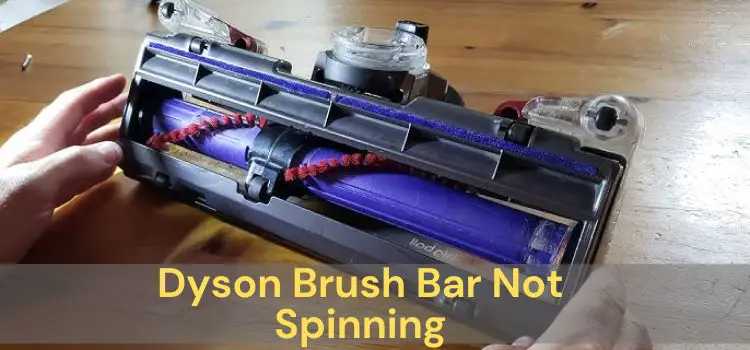
A brush bar is the rotating roller inside the floor head. It agitates carpet fibers and lifts dirt. Some Dyson heads have one motorized roller, while others have separate rollers or soft rollers for hard floors.
If suction still works but the brush does not move, the fault is often limited to the cleaner head or its power connection. If the vacuum also pulses, shuts off, or shows a blockage warning, inspect the full air path and filters.
Check the model before troubleshooting
Look for the model name on the handle, battery, bin, or product label. Examples include Dyson V7, V8, V10, V11, V12, V15, Gen5, Ball Animal, and older DC models.
The design changes by model. For example:
- Many cordless Dyson vacuums use a removable cleaner head with electrical contacts.
- Some cordless models use a trigger, while others use a power button.
- Some heads are designed for carpet, while soft roller heads are designed mainly for hard floors.
- Older upright Dyson vacuums may use a belt or clutch system.
- A cleaner head from one Dyson series may not work correctly on another series.
Do not force a head onto the wand. If the part does not click into place, it may not be compatible.

How to fix a Dyson brush that stopped spinning
Follow these steps in order. Stop if you smell burning, see melted plastic, or hear a harsh grinding sound.
1. Turn off and isolate the vacuum
Switch the vacuum off. Unplug a corded model. For a cordless model, remove it from the charger and let the motor stop fully.
If the brush head has a removable battery or electrical connection, do not work on the head while the vacuum can start. Keep fingers, hair, clothing, and tools away from the brush bar.
Never test the brush by placing your hand near the roller while the vacuum is powered.
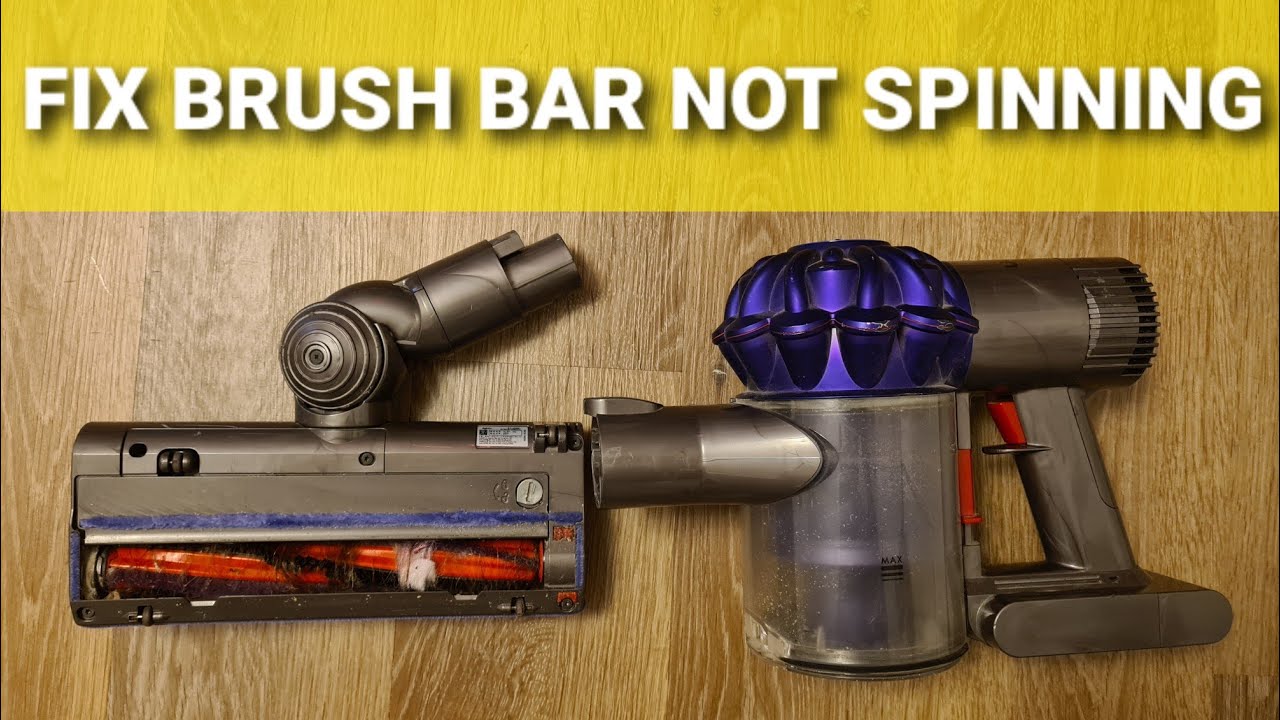
2. Remove the cleaner head
press the release button or catch that connects the cleaner head to the wand or main body. Set the vacuum aside.
Inspect the connection points. Look for:
- Packed dust
- Bent metal contacts
- Cracked plastic
- Loose parts
- Dirt blocking the release mechanism
Wipe dry electrical contacts with a soft, dry cloth. Do not pour water into the connector.
3. Remove hair and debris from the brush bar
Cut wrapped hair and thread with scissors. Keep the scissor tips away from the bristles and belt. Pull the debris out by hand.
Pay close attention to:
- Both ends of the roller
- The end caps
- The brush-bar axle
- The opening where debris enters the head
- The small wheels near the roller
A thick ring of hair at one end can add enough resistance to stop the brush motor. Pet hair can also pack behind the roller, where it is hard to see.
If the brush bar is designed to come out, follow the instructions in the owner’s manual. Do not pry off a sealed end cap or remove screws unless Dyson documents that procedure for your model.
4. Check that the brush bar turns freely
With the vacuum off and the cleaner head removed, turn the brush bar by hand if the design allows it.
A healthy brush bar should turn with some resistance but should not feel locked. Compare these signs:
| What you feel | Likely meaning |
|---|---|
| It turns smoothly | The blockage may be elsewhere |
| It turns, then stops at one point | Debris or a damaged bearing may be present |
| It is hard to turn | Hair, thread, or a seized end bearing may be the cause |
| It will not turn at all | A serious blockage or mechanical failure may exist |
Do not apply oil or lubricant unless Dyson specifically instructs you to do so. Oil can collect dust and may damage parts inside the cleaner head.
5. Inspect the wand and air path
Look through the wand and cleaner-head opening. A blockage can reduce airflow and cause the vacuum to shut the brush motor off.
Remove visible debris from the wand with care. Do not push a sharp object through the tube. A rigid tool can puncture the wand or push the blockage deeper.
Check the bin inlet and cyclone area as well. Empty the bin if it is full. A full bin does not always stop the brush directly, but it can reduce airflow and trigger protection systems.
6. Reattach the head until it clicks
Reconnect the cleaner head to the wand or vacuum body. Push firmly until you hear or feel a click.
A loose connection may allow suction but fail to supply power to the brush motor. This can make the vacuum appear to work normally while the roller remains still.
Try the head again on a clear floor. Keep the vacuum head flat. Some motorized heads may stop if they are lifted or held at an unusual angle.
7. Charge the battery or check the power supply
A low battery can cause a Dyson cordless vacuum to stop the brush bar before it stops all other functions.
Fully charge the vacuum with the correct Dyson charger. Then check whether the charging light behaves normally. If the vacuum will not charge, try the basic checks in the model’s manual rather than using a third-party charger.
For a corded Dyson, inspect the power cord and plug. Do not use the vacuum if the cord is cut, crushed, hot, or sparking.
8. Clean the filters correctly
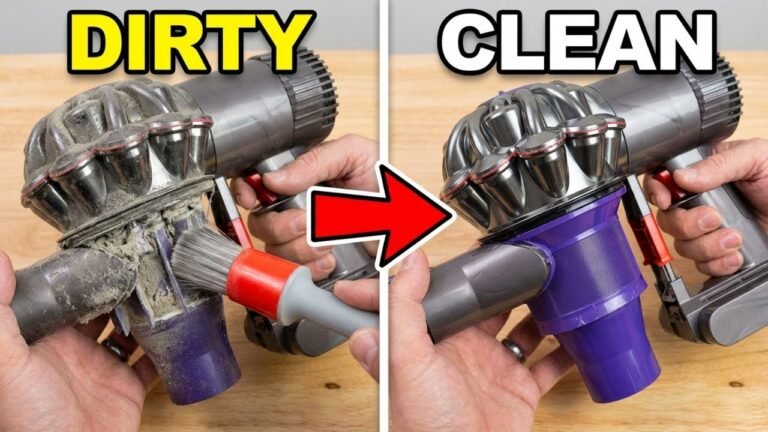
A dirty filter can restrict airflow and cause pulsing or automatic shutoff. Dyson models differ, but many cordless models have washable filters.
Before washing a filter:
- Remove it as shown in the model manual.
- Tap off loose dust outdoors or over a bin.
- Rinse with cold water.
- Do not use soap or detergent unless Dyson says otherwise.
- Squeeze out excess water gently.
- Leave the filter to air-dry fully before reinstalling it.
A filter may need at least 24 hours to dry. Do not reinstall a damp filter. Moisture can damage the motor and create an electrical hazard.
Cleaning a filter will not repair a failed brush motor, but it can solve pulsing and overheating caused by restricted airflow.

What the symptom tells you
The behavior of the vacuum can narrow the cause. Use this table as a guide, not as a final diagnosis.
| Symptom | More likely causes | First check |
|---|---|---|
| Brush does not spin, but suction is normal | Hair, loose head, failed cleaner-head motor | Remove debris and reseat the head |
| Brush spins briefly, then stops | Blockage, overload, low charge, overheating | Clear the roller and let the vacuum cool |
| Vacuum pulses on and off | Blocked air path, dirty filter, full bin | Empty the bin and inspect filters |
| Brush spins in the air but stops on carpet | Heavy resistance, worn brush, damaged drive | Test on a clear floor, then inspect the roller |
| Cleaner head makes a clicking sound | Debris, damaged gear, worn bearing | Stop use and inspect the head |
| Burning smell or hot plastic | Motor, belt, wiring, or obstruction fault | Stop using the vacuum |
| No lights and no operation | Battery, charger, switch, or power fault | Check charging and model support |
| Suction works only without the head | Blocked head or head connection fault | Inspect the head opening and contacts |
A brush that turns in the air but stops when it touches carpet may not be completely healthy. The carpet adds resistance. If the roller stops on all carpets after cleaning, the cleaner-head motor, drive system, or brush bar may be worn.
Why a Dyson may shut the brush off
Many vacuums use protection controls. If the brush bar meets too much resistance, the machine may stop the roller to protect the motor or prevent damage.
This can happen when:
- A rug fringe wraps around the roller
- Long hair jams an end cap
- The head is pressed too hard into thick carpet
- A foreign object enters the brush opening
- The brush motor overheats
Turn the machine off and clear the cause. Repeatedly restarting a jammed brush can worsen motor or wiring damage.
Model-specific issues to check
Dyson cordless V-series vacuums
For a Dyson V7, V8, V10, V11, V12, V15, or similar cordless model, check the cleaner-head connection first. The electrical contacts must align with the matching contacts on the wand or body.
Also check:
- Battery charge
- Filter condition
- Wand blockage
- Cleaner-head end caps
- Correct use of the power button or trigger
- Whether the selected head is made for the surface being cleaned
A flashing light or an on-screen blockage message can provide more information. The meaning of lights differs by model, so use the manual for that exact vacuum.
Dyson upright vacuums
An upright Dyson may use a belt, clutch, or brush-control system. The brush may be turned off when cleaning hard floors, depending on the model.
Check the brush-control switch or button. If the setting is correct but the brush still does not turn, inspect for a jam. Do not assume that every upright Dyson has the same belt-access method.
A stretched or broken belt can cause the brush to stop, but belt replacement is model-specific. Use the official manual or a qualified repair service before opening the base.
Dyson canister and cylinder vacuums
On a canister or cylinder model, the cleaner head, hose, and wand can each affect airflow. Check each connection and look for a blockage in the hose.
If suction is weak throughout the system, the issue may not be the brush bar. Empty the bin or bag where applicable and clean the filters according to the manual.

When cleaning does not solve the problem
If the brush still does not spin after you clear the head, clean the filters, charge the vacuum, and reseat the connections, the fault may be electrical or mechanical.
Possible failed parts include:
- Cleaner-head motor
- Brush-bar bearing
- Drive gear
- Belt or clutch
- Electrical contact
- Battery
- Control switch
- Main control board
Do not open the main motor housing or battery pack unless the manufacturer specifically authorizes that repair. Lithium-ion battery packs can present fire and shock risks if damaged or handled incorrectly.
Contact Dyson support or a qualified appliance repair technician when:
- The vacuum smells like burnt plastic
- The cleaner head becomes unusually hot
- You hear grinding, repeated clicking, or sparking
- The battery swells or becomes very hot
- The cord or plug is damaged
- The brush stops immediately after every restart
- The machine is still under warranty
- A replacement part is needed
Have the model number, serial number, purchase information, and a description of the symptoms ready. Dyson may need those details to identify the correct cleaner head or replacement part.
Common mistakes to avoid
Do not wash the entire cleaner head
Many motorized heads contain electrical parts. Unless the Dyson manual says the head is washable, keep it dry. Clean the brush bar and housing with a dry cloth or the method Dyson provides.
Do not use the vacuum with a damp filter
A damp filter can send moisture toward the motor. Let it dry completely before reinstalling it.
Do not use a mismatched cleaner head
A head may physically fit while its electrical contacts or control system do not match the vacuum. Use a part listed for your model.
Do not keep restarting a jammed brush
Repeated starts can add heat and stress to the motor. Clear the obstruction first.
Do not pull hair with force
Force can damage the brush bearing or pull bristles from the roller. Cut the hair into smaller sections and remove it slowly.
Do not ignore a burning smell
A burning smell is not normal “dust burn-off.” Stop using the vacuum and allow it to cool. If the smell returns, seek service.

Frequently asked questions
Why is my Dyson brush bar not spinning on carpet?
A jam, hair buildup, low battery, or heavy carpet resistance may be responsible. Clear the roller, charge the vacuum, and test the head on a clean hard floor. If it spins on hard floor but stops on carpet, the roller or drive system may be struggling under load.
Why does my Dyson brush spin for a few seconds and then stop?
The vacuum may be detecting excess resistance or overheating. Hair at the roller ends is a common cause. Turn the vacuum off, remove the debris, check the air path, and let the machine cool before testing it again.
Can a dirty filter stop the Dyson brush from spinning?
Yes, indirectly. A clogged filter can reduce airflow and cause pulsing or automatic protection shutdown. Clean the filter as directed for your model and reinstall it only after it is fully dry.
Why is my Dyson vacuum making a clicking noise?
Clicking can indicate debris in the roller, a damaged end cap, a worn bearing, or a problem with the drive gear. Stop the vacuum and inspect the brush bar. Continued clicking after cleaning usually requires service or a replacement cleaner head.
Should I replace the battery if the brush is not spinning?
Not automatically. A low or failing battery can reduce performance, but hair, a blockage, a loose head, or a failed brush motor can cause the same symptom. Check the cleaner head and connections before buying a battery.
Final recommendation
Start with the brush bar. Turn the Dyson off, remove hair and debris, inspect the head and wand, clean the filters correctly, charge the vacuum, and reconnect every part until it clicks. If the brush still will not spin—or the vacuum smells hot, sparks, or makes grinding sounds—stop using it and contact Dyson support or a qualified repair service.
For the next step, identify the exact Dyson model and compare its cleaner-head and filter instructions with the official U.S. manual.
One Comment