A Dyson cordless vacuum that is not holding a charge may have a clogged filter, blocked airway, damaged charger, poor dock contact, or an aging battery. In U.S. homes, most Dyson cordless vacuums use a removable or built-in lithium-ion battery. These batteries lose capacity over time, so a vacuum may show a full charge but run for only a few minutes.
Start with the safe checks first: use the correct Dyson charger, clean the filter, remove blockages, inspect the charging contacts, and let the vacuum return to room temperature. If the battery still drains fast after these steps, replacement or Dyson service may be needed.
What “Not Holding a Charge” Means
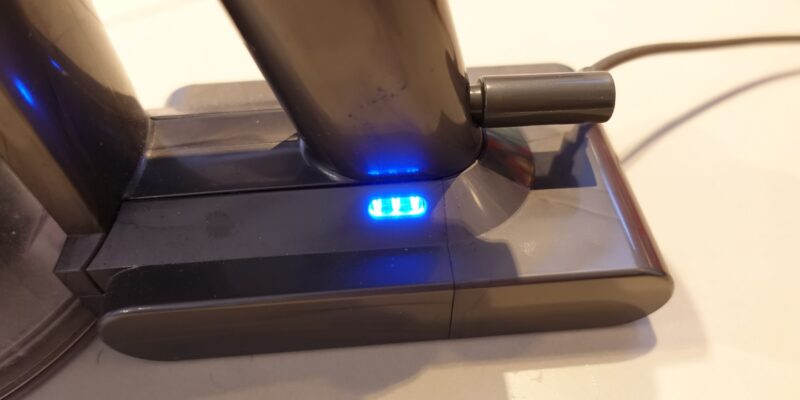
A Dyson is not holding a charge when it charges normally but runs for much less time than expected. It may also stop soon after you remove it from the charger, show a flashing light, or lose power under normal use.
This problem is different from a vacuum that will not charge at all.
| Symptom | More likely cause |
|---|---|
| No lights or charging response | Outlet, charger, dock, or battery fault |
| Charges but stops after a few minutes | Old battery, blockage, dirty filter, or high-power mode |
| Runs only on Max mode for a short time | Normal battery drain made worse by Max power |
| Shuts off during use and works again later | Overheating, blockage, or battery protection |
| Starts and stops in short bursts | Airflow problem, filter issue, or electrical fault |
| Shows a full charge but loses power quickly | Battery capacity loss or charging problem |
A battery can report “full” even when it can no longer store as much energy as it did when new. Think of it like a small water tank with a lower capacity. The gauge may say the tank is full, but the tank now holds less.
Quick Checks Before You Troubleshoot
Before testing the vacuum, remove it from the charger and turn it off. Do not open the battery pack or use a damaged charger.
Check these points:
- Confirm that the charger belongs to the correct Dyson model.
- Plug the charger into a known working U.S. wall outlet.
- Check the power cord, plug, and adapter for cuts, heat damage, or loose parts.
- Make sure the battery, wand, bin, and cleaner head are fitted correctly.
- Remove the vacuum from Max or Boost mode.
- Let a hot vacuum cool to room temperature.
- Keep the filter and charging area dry.
Dyson models differ. Some have a wall-mounted dock, while others charge through a direct connector. Some batteries can be removed by the owner, while others require service. Use the manual for your exact model before removing any part.

Why Your Dyson Vacuum Is Losing Charge Quickly
The most common reason is an aging battery, but several other faults can create the same symptom.
1. The battery has lost capacity
Lithium-ion batteries slowly lose capacity through use and age. A battery may still accept a charge, yet provide much less runtime.
Battery wear is more likely when:
- The vacuum is several years old.
- Runtime has declined slowly over many months.
- The vacuum shuts off quickly even after filter cleaning.
- The charge indicator reaches full but the vacuum runs for a short time.
- The vacuum performs better with a different battery, if the model supports one.
Battery life also depends on the model, mode, motor load, storage conditions, and number of charge cycles. Dyson does not give one universal battery lifespan for every cordless model.
2. Max mode uses power very fast
Max, Boost, or high-power mode can drain a battery far faster than normal mode. It creates more suction, but it also places a greater load on the motor and battery.
Test the vacuum in its normal power setting on a hard floor. If it runs much longer there, the battery may be working normally. A short runtime in Max mode alone does not prove that the battery is defective.
3. A dirty filter restricts airflow
A clogged filter makes the motor work harder. The vacuum may then shut down to protect itself or show a pulsing power pattern.
A Dyson filter often needs regular washing, but the exact schedule varies by model. Dyson commonly directs owners to wash filters with cold water and allow them to dry fully before reinstalling them. Do not put a damp filter back into the vacuum.
A wet filter can damage the motor and create a safety risk.
4. A blockage is making the motor work harder
Hair, dust, pet fur, and larger debris can block the wand, cleaner head, bin inlet, or cyclone area. A blockage may cause:
- Pulsing suction
- A sudden stop
- A hot motor
- Reduced runtime
- A red or flashing warning light
Check the wand and cleaner head for debris. Turn off the vacuum first. Use care around brush bars and sharp objects.
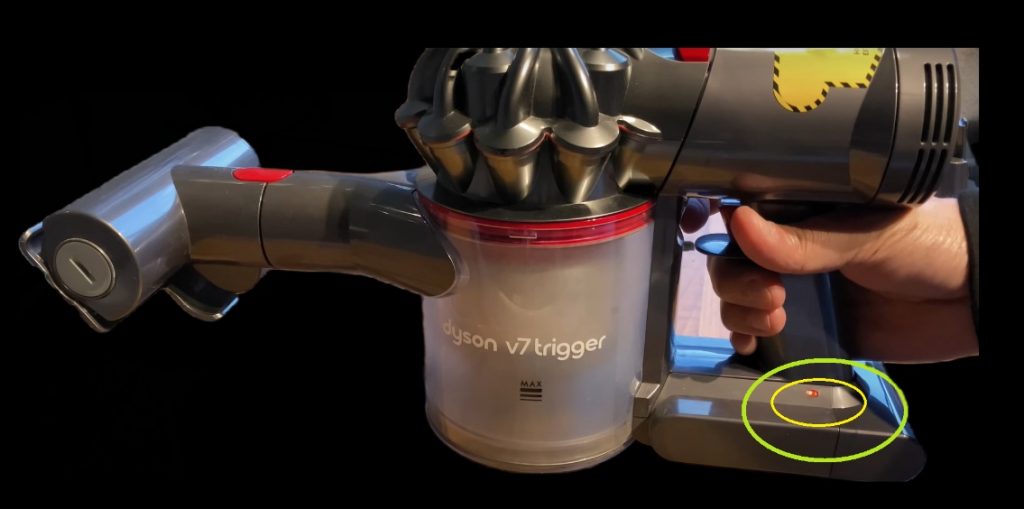
5. The charger or dock is not making a good connection
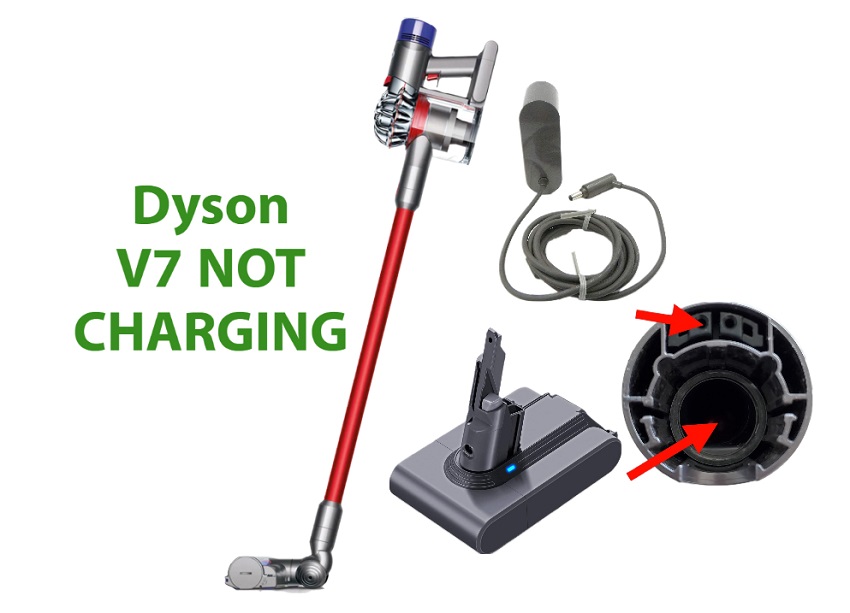
A loose plug, damaged power adapter, dirty contact, or poorly fitted dock can stop the battery from charging fully.
Look for:
- No charging light
- A light that turns off too soon
- Charging that starts only when the vacuum is moved
- A dock that feels loose
- Dirt on the charging contacts
- A charger that becomes unusually hot
Do not scrape contacts with metal tools. If the charger is damaged, replace it with a Dyson-approved charger for the exact model.
6. The battery is too hot or too cold
Lithium-ion batteries may stop charging or operating outside their safe temperature range. A vacuum that was used heavily, left in a hot car, or stored in a cold garage may need time to return to room temperature.
Move it to a dry indoor area. Do not heat the battery with a hair dryer, radiator, or direct sunlight.
7. A part or electrical connection has failed
If the filter is clean, the airway is clear, the charger is correct, and the battery still fails, the fault may involve the battery, control board, motor, or charging circuit.
This is not a good DIY repair for most owners. Dyson batteries contain cells and protective electronics. Do not puncture, crush, short, or open the pack.
How to Fix a Dyson That Is Not Holding Charge
Follow these steps in order. Each step removes a common cause without requiring battery disassembly.
Step 1: Check the power source
Plug the charger into a known working wall outlet. Avoid testing through a loose extension cord or a switch that may be off.
If the charger has an indicator light, check whether it changes when connected. The light behavior varies by model, so compare it with the exact Dyson manual.
If there is no response:
- Try another outlet.
- Reseat the charger plug.
- Inspect the cable and adapter.
- Check the dock connection.
- Test the vacuum with the approved direct charger, if your model allows it.
Stop using the charger if it is cracked, frayed, smells burnt, or becomes abnormally hot.
Step 2: Charge the vacuum at room temperature
Place the vacuum in a dry indoor room. Let it cool if it was just used or warm up if it was stored in a cold area.
Then connect it to the charger and leave it undisturbed for the full charging period listed for your model. Do not assume that a short top-up is enough to test battery health.
A successful charge usually produces the model’s normal charging light or display response. A full indicator does not confirm that the battery has its original capacity.
Step 3: Clean the filter correctly
Turn off and unplug the vacuum from the charger before cleaning.
In general:
- Remove the filter as shown in the manual.
- Shake off loose dust outdoors or over a trash can.
- Rinse with cold water.
- Keep washing until the water runs clear.
- Squeeze out excess water without twisting hard.
- Let the filter air-dry completely.
- Reinstall it only when fully dry.
Drying time depends on airflow and humidity. Waiting at least 24 hours is a practical minimum for many washable filters, but follow the instructions for your model.
Do not use soap, bleach, a dishwasher, a dryer, or forced heat unless Dyson specifically permits it.
Step 4: Clear the wand and cleaner head
Inspect the full air path:
- Floor head
- Brush bar
- Wand
- Bin inlet
- Cyclone openings
- Connection points
Remove hair from the brush bar with care. Keep fingers away from moving parts. Do not run the vacuum while a blockage remains.
If a brush bar is jammed, the vacuum may stop even when the battery is healthy.
Step 5: Test the vacuum in normal mode
Run the vacuum without an attachment on a clean floor. Use the standard power setting.
Note the result:
- Normal runtime returns: Max mode, a blockage, or a dirty filter may have caused the earlier problem.
- It still stops quickly: Battery wear or an electrical fault becomes more likely.
- It pulses: Check the filter, bin, wand, and cleaner head again.
- It becomes very hot: Stop use and let it cool.
Do not repeatedly restart a vacuum that shuts down from heat or a blockage.
Step 6: Inspect the battery and contacts
If the battery is removable, check that it sits firmly in place. Look for swelling, cracks, leaks, scorch marks, or a burnt smell.
Do not use a battery with any of these signs. Move it away from flammable items only if you can do so safely, and contact Dyson or a qualified battery service provider for advice. Do not put a damaged lithium-ion battery in household trash.
For built-in batteries, do not pry open the vacuum. Arrange service instead.
Step 7: Compare the result with the model’s expected runtime
Runtime depends on the model and cleaning mode. A lightweight handheld test in normal mode is not the same as cleaning thick carpet with a motorized head.
Use the runtime stated in your model’s manual as a guide, not a promise for every home. A vacuum that runs for 40 minutes with a non-motorized tool may run for much less with a powered cleaner head.

How to Tell Whether the Battery Needs Replacement
A battery replacement is more likely when all of these conditions are true:
- The vacuum charges with the correct adapter.
- The filter is clean and completely dry.
- The airway and brush bar are clear.
- The vacuum has cooled to room temperature.
- Normal mode still gives very short runtime.
- The problem developed gradually.
- The battery shows physical damage or swelling.
A replacement is less certain when the vacuum does not charge at all. That symptom may point to the charger, dock, contacts, battery, or internal charging circuit.
Battery replacement decision table
| Result after basic checks | Best next action |
|---|---|
| No charging light with several outlets | Check charger and contact points; contact Dyson if unresolved |
| Full charge, short runtime in all modes | Ask Dyson about a compatible replacement battery |
| Short runtime only in Max mode | Use normal mode and check for blockages |
| Pulsing with a clean filter | Inspect the airway and cleaner head |
| Battery is swollen or cracked | Stop using it and seek service |
| Vacuum works after cooling | Check for heat, blockage, and filter problems |
| New battery does not solve the issue | Service may be needed for the charger, board, or motor |
Use only a battery listed as compatible with your exact Dyson model and region. Similar-looking Dyson batteries are not automatically interchangeable.
Charging and Storage Habits That May Help
Good care cannot restore lost battery capacity, but it can reduce avoidable stress.
- Store the vacuum indoors in a dry place.
- Keep it away from extreme heat and freezing temperatures.
- Do not cover a charger or battery while it is charging.
- Keep the filter clean and dry.
- Empty the bin before debris reaches the marked limit.
- Use normal mode for routine cleaning when it provides enough suction.
- Do not keep using the vacuum after repeated overheating warnings.
- Use the original or Dyson-approved charging equipment.
- Follow the charging guidance in the manual for your model.
You do not need to drain a modern lithium-ion battery to zero before charging it. Frequent full discharges are not required for normal use.
Some Dyson models are designed to remain on the dock between uses. Other models and battery packs may have different instructions. The model manual takes priority.
Common Mistakes to Avoid
Do not wash the whole vacuum
Only washable parts listed by Dyson should contact water. Water inside the motor, battery, display, or charging port can cause damage.
Do not use a damp filter
A filter that feels cool or slightly wet is not ready. Let it dry fully in moving air before installation.
Do not buy a battery by appearance alone
Different Dyson models may use different battery shapes, voltages, connectors, and control systems. Match the model number, not just the color or screw pattern.
Do not keep testing a hot vacuum
A shutdown can be a protective response. Repeated use while hot can worsen the fault.
Do not open the battery pack
A lithium-ion battery pack can deliver high current. A short circuit, puncture, or damaged cell can cause fire.
Do not judge battery health from one short test
Cleaning thick carpet, using a motorized head, and selecting Max mode can greatly increase power use. Test under the same conditions in normal mode before deciding that the battery has failed.

When to Contact Dyson or Seek Service
Contact Dyson support when basic checks do not restore normal operation, especially if the vacuum is still under warranty or covered by a service plan.
Have this information ready:
- Exact model name or model number
- Purchase date, if known
- Charging light behavior
- Runtime in normal mode
- Whether the filter was cleaned and dried
- Whether the vacuum pulses, overheats, or stops
- Charger and battery condition
- Proof of purchase, if available
Stop using the vacuum and seek help promptly if you notice:
- Smoke
- A burning smell
- Battery swelling
- Melting plastic
- Sparks
- A cracked battery
- Unusual heat while idle or charging
For U.S. owners, Dyson’s official support pages are the right place to check model-specific manuals, troubleshooting steps, warranty terms, and compatible parts. Warranty coverage can depend on the model, purchase date, seller, and type of failure.
Frequently Asked Questions
Why does my Dyson say it is fully charged but die after a few minutes?
The battery may have lost capacity. A clogged filter, blocked airway, high-power mode, or overheating can cause the same result. Clean and dry the filter, clear the airway, and test the vacuum in normal mode before replacing the battery.
How long should a Dyson cordless battery last?
There is no single runtime or service life for every Dyson model. Runtime changes with power mode, cleaner head, floor type, battery age, and temperature. Use the specifications and manual for the exact model.
Can I leave my Dyson on the charger all the time?
Follow the instructions for your model. Many Dyson cordless systems are designed to charge on their dock between uses, but the exact guidance can differ. Use the original charging equipment and keep the area dry and ventilated.
Can a Dyson battery be repaired?
Most owners should replace the battery as an approved part or use Dyson service rather than open the pack. Cell-level repair can create fire and shock hazards.
Why does my Dyson stop and start while I use it?
Pulsing often points to restricted airflow. Check the filter, bin, wand, cyclone openings, and cleaner head. If the airway is clear and the problem continues, the battery or motor system may need service.
Key Takeaways
- A Dyson that charges but runs briefly often has an aging battery, dirty filter, blockage, or heavy power setting.
- Test it in normal mode after cleaning and fully drying the filter.
- Check the charger, dock, outlet, contacts, and battery temperature.
- Do not use a swollen, cracked, hot, or damaged battery.
- Replace the battery only with a part confirmed for the exact Dyson model.
- Contact Dyson when the vacuum still fails after safe maintenance checks.
Conclusion
A Dyson not holding charge does not always need a new battery. Start with the charger, outlet, filter, airflow path, cleaner head, temperature, and power mode. These checks solve many short-runtime problems without opening the vacuum.
If the vacuum still loses power quickly in normal mode after proper cleaning, the battery has likely lost capacity or another electrical part has failed. Use Dyson’s model-specific support and avoid DIY battery disassembly, especially when the pack is swollen, cracked, hot, or damaged.