A Dyson vacuum light can show that the machine is charging, the battery is low, the filter needs care, or the vacuum has a blockage. The exact meaning depends on the model, such as a Dyson V8, V10, V11, V12, V15, Outsize, Gen5, or an upright model sold in the United States.
Start with the light pattern, not just the color. A steady light and a flashing light can mean very different things. If the light is red, the vacuum stops, smells hot, or makes an odd noise, turn it off and remove it from the charger before checking it.
Introduction: What Does a Dyson Vacuum Light Mean?
Most Dyson cordless vacuums use lights to show four basic states:
- Blue: charging, ready to run, or normal battery operation
- Red: a fault, low battery, blocked air path, or battery issue
- White: a filter warning or another model-specific alert
- Green: a cleaning head light or laser feature on some models
A light alone does not identify the fault. Check whether it is steady, flashing, pulsing, or paired with a symbol on the screen. The model name and serial number can also help you match the signal to the correct Dyson guide.

Dyson Vacuum Light Colors and Their Common Meanings
The table below gives common meanings. It is a starting point, not a replacement for the manual for your exact Dyson model.
| Light or signal | Common meaning | First action |
|---|---|---|
| Solid blue | The battery may have power or the machine may be ready | Press the trigger or power button |
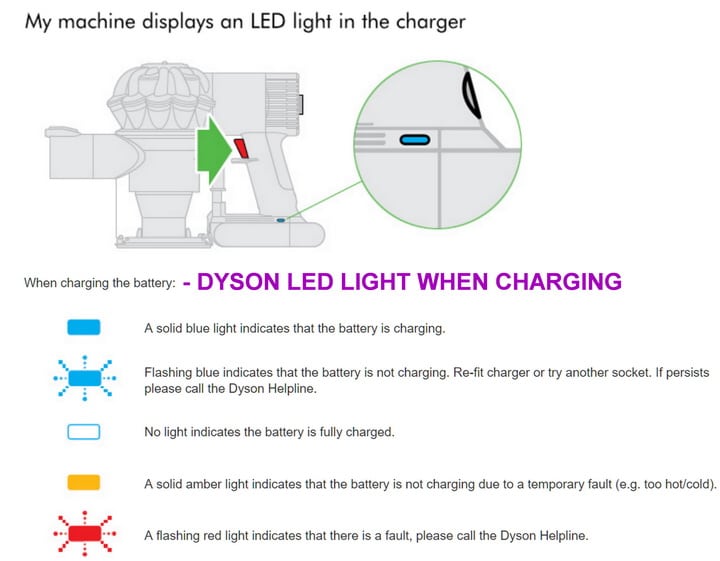
| Flashing blue | The battery is charging | Leave it on the charger |
| Blue light that stops quickly | The battery may be fully charged or the machine may have a fault | Try the vacuum away from the charger |
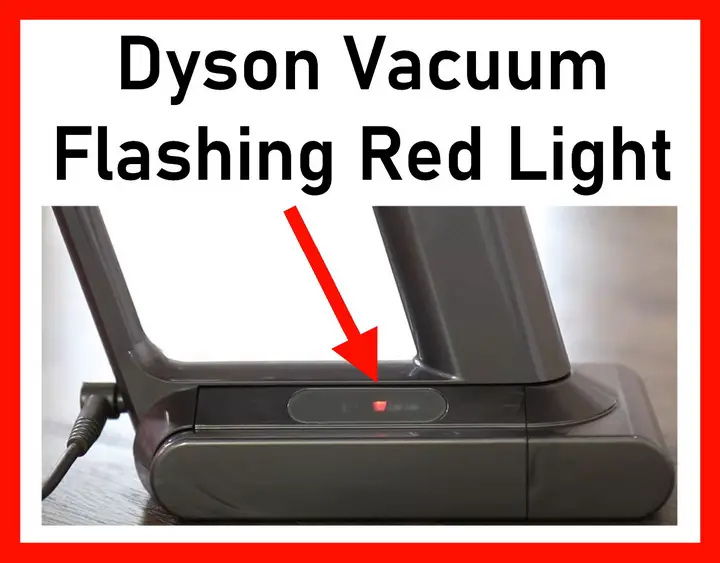
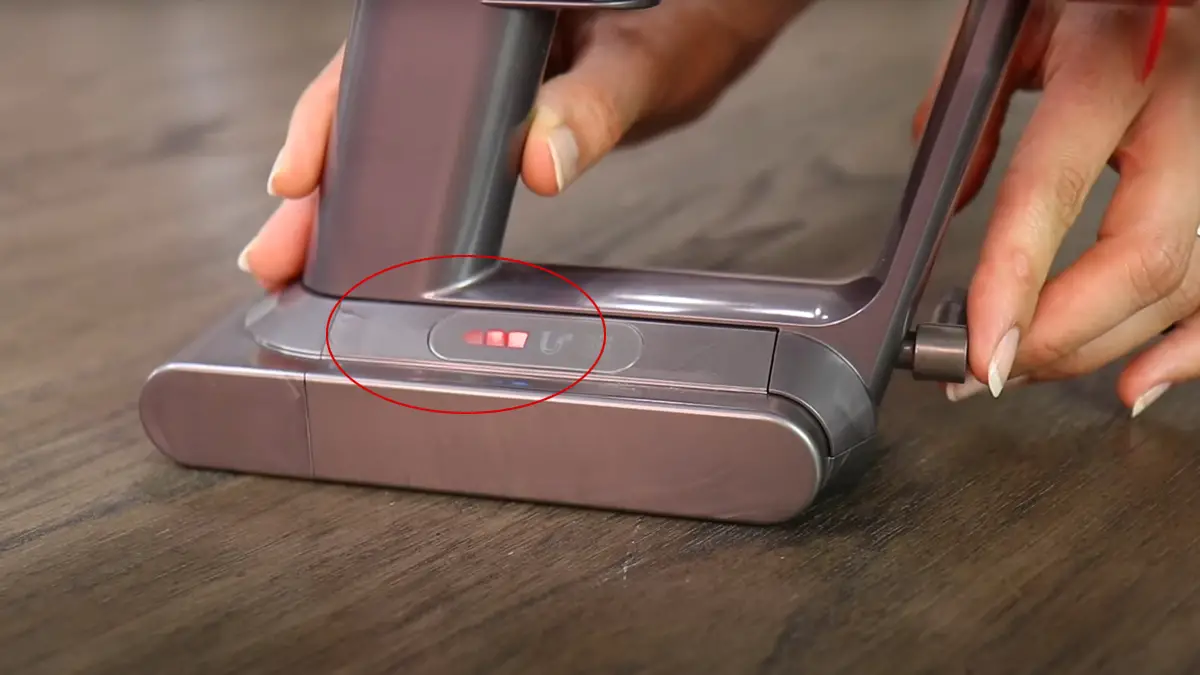
| Flashing red | A fault, blockage, or battery problem | Turn it off and check the air path |
| Solid red | A fault or battery warning on some models | Stop use and check the manual |
| White filter symbol or light | The filter needs cleaning or fitting | Remove, wash, and dry the filter as directed |
| Green light on a cleaner head | Laser or illuminated dust feature is active | This can be normal |
| No light | No power, a flat battery, a failed charger, or an internal fault | Test the outlet and charger |
Dyson uses different light systems across its product range. For example, a Dyson V15 Detect may show information on an LCD screen, while an older V8 may use a small set of indicator lights. An upright Dyson Ball model may have different brush bar or filter indicators.
A steady light is not the same as a flashing light
A steady blue light often shows normal operation or a charged battery. A pulsing or flashing blue light commonly appears during charging. A red flash usually deserves more attention, especially if the vacuum stops after a few seconds.
The number of flashes may also matter. Some Dyson batteries use a repeated red-light pattern to indicate a fault. Record the pattern before removing the battery or contacting Dyson Support.
The screen may explain the light
Models with an LCD screen can show messages such as:
- Filter needs cleaning
- Airway blocked
- Battery low
- Battery fault
- Filter not fitted
- Cleaner head blocked
Read the message before taking the vacuum apart. A screen warning is often more useful than the color alone.

Why Is My Dyson Vacuum Light Flashing?
A flashing Dyson vacuum light usually means the machine is reporting a change in status. The safest fix depends on the color and whether the motor runs.
Flashing blue light
A flashing blue light often means the cordless vacuum is charging. Check that:
- The charger is fully inserted into the wall outlet.
- The charging cable is firmly connected to the vacuum or wall dock.
- The wall outlet works.
- The battery and charging contacts are clean and dry.
- The vacuum is at room temperature.
A very hot or very cold battery may not charge normally. Let it return to room temperature before trying again.
If the blue light keeps flashing but the run time does not improve, the charger or battery may have a fault. Do not use a damaged power cord or a battery with swelling, cracks, leaks, or a strong chemical smell.
Flashing red light
A flashing red light may indicate a blockage, battery fault, or internal problem. Use this order:
- Turn the vacuum off.
- Remove the charger.
- Remove the wand and cleaner head.
- Check the wand for hair, dust, or a lodged object.
- Check the cleaner head and brush bar.
- Empty the dust bin.
- Clean the filter if the manual allows it.
- Refit each part firmly.
- Test the vacuum in its normal mode.
If the red light returns after these checks, stop using the vacuum. Contact Dyson Support or an authorized repair provider. Repeated red warnings can point to a battery or motor fault that home cleaning will not fix.
Flashing white or a filter warning
A white warning often relates to the filter. A dirty filter restricts airflow, which can reduce suction and make the motor work harder.
Remove the filter only as described in the manual. Many Dyson cordless filters can be rinsed with cold water, but they must dry fully before use. Dyson commonly advises allowing the filter to dry for at least 24 hours. Never install a damp filter.
If the filter light stays on after cleaning, check that:
- The filter is the correct part for the model.
- It is fully seated.
- The filter cap or housing is closed.
- The filter is not torn or misshapen.
- The vacuum has been reset if the manual lists a reset step.

How to Fix a Dyson Vacuum That Has No Light
A Dyson vacuum with no light may have a flat battery, a power problem, or a failed part. Begin with simple checks.
For a cordless Dyson
- Check the charger. Look for cuts, bent pins, or heat damage.
- Test the outlet. Plug in another small device.
- Check the dock. Make sure the vacuum sits correctly in the wall dock.
- Charge it for the normal charging period. The time differs by model.
- Try the charger without the dock. Some models charge from a direct port.
- Check the battery. Look for swelling, cracks, or unusual heat.
- Try the power trigger or button. Some Dyson models use a trigger; others use a power button.
If the vacuum works only while connected to the charger, the battery may be worn or faulty. Do not open a lithium-ion battery pack. Dyson or a qualified service provider should handle battery replacement.
For a corded Dyson upright or canister
Check the power cord, plug, outlet, and reset switch if the model has one. A thermal cutout may shut the vacuum down if the motor overheats. Turn it off, unplug it, and let it cool before checking for a blockage.
Do not keep restarting a vacuum that smells hot or trips a circuit breaker. That can turn a small fault into a larger electrical problem.
How to Reset a Dyson Vacuum Light
A reset can clear a temporary warning, but it will not repair a failed battery, damaged filter, or blocked airway.
For many Dyson cordless models:
- Turn the vacuum off.
- Remove it from the charger.
- Remove the wand and cleaner head.
- Empty the bin.
- Check and clean the filter as directed.
- Allow washed parts to dry fully.
- Reassemble the vacuum.
- Charge it, then test it.
Some Dyson models have a specific filter or blockage reset method. The button sequence is not the same across all products. Use the owner’s guide for the exact model instead of trying random button combinations.
If the warning returns at once, the cause is likely still present. A reset should be treated as a check, not a cure.
Dyson Green Light: Is It Normal?
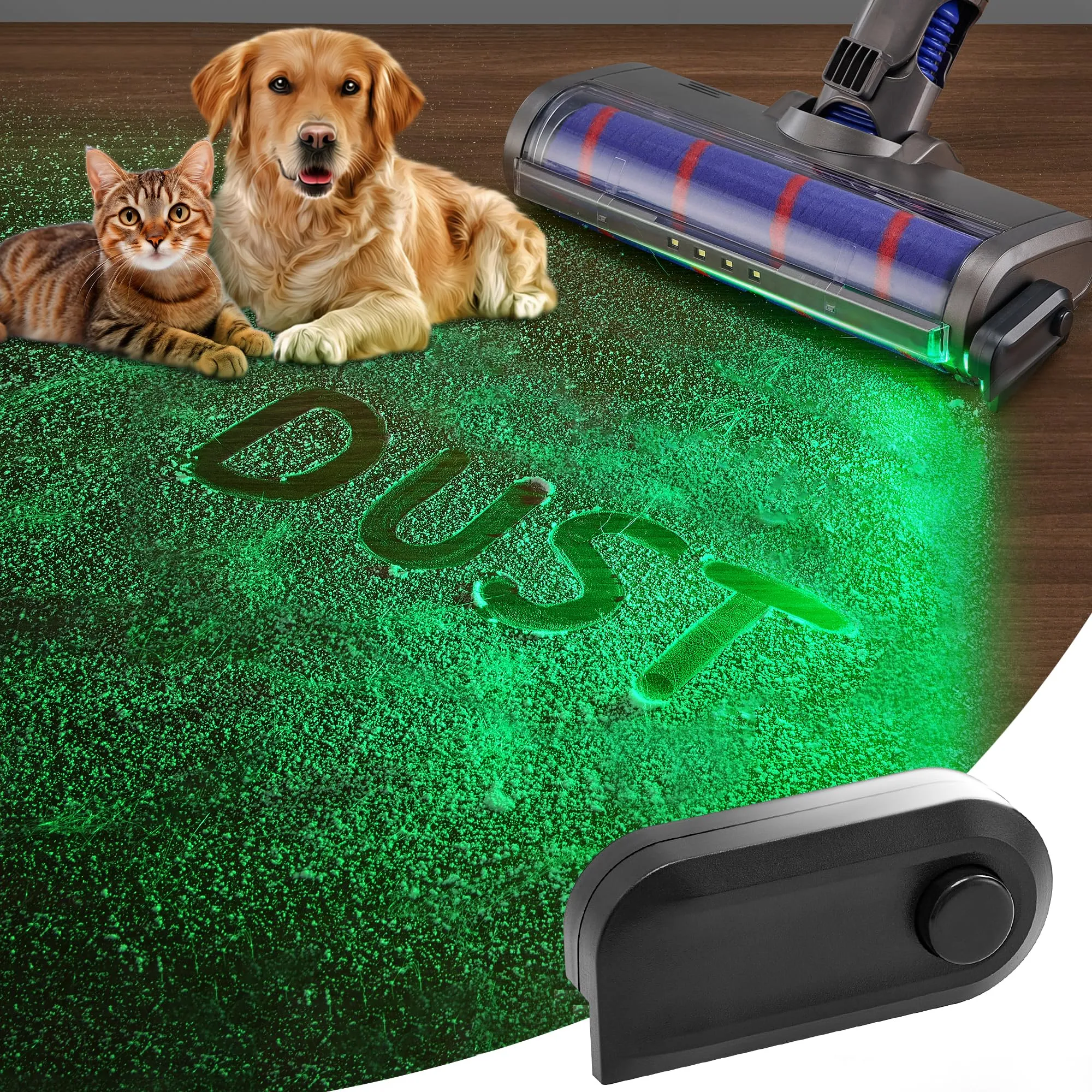
A green light on a Dyson cleaner head is often normal. Some Dyson Detect models use a green laser to make fine dust easier to see on hard floors. The light may appear on the cleaner head rather than on the main vacuum body.
Use the green light only as a cleaning aid. It does not prove that the floor is free of bacteria, allergens, or every type of dust. Bright room lighting can also make the laser less visible.
If the green light flickers, disappears, or fails to turn on:
- Confirm that the correct cleaner head is attached.
- Check the cleaner head for a blockage.
- Make sure the machine has power.
- Check whether the light feature is switched on.
- Review the model guide.
Do not stare into a laser or point it at a person’s eyes. Keep children and pets from looking directly into the beam.
Dyson Vacuum Light Troubleshooting by Symptom
The table below links the light to the most useful next check.
| Symptom | Likely areas to check | What to do |
|---|---|---|
| Vacuum will not start and no light appears | Outlet, charger, battery, power button | Test the outlet and charger |
| Vacuum starts, then stops with a red light | Blockage, filter, overheating, battery | Let it cool, then inspect the airway |
| Suction is weak and a warning appears | Full bin, dirty filter, blocked head | Empty, clean, and refit parts |
| Light appears only on the charger | Charging connection or battery | Check the dock and charging contacts |
| Green cleaner-head light is absent | Head attachment or feature setting | Refit the head and check the guide |
| Filter warning returns after cleaning | Damp, damaged, wrong, or loose filter | Use a dry, correct filter |
| Vacuum pulses on and off | Airflow restriction or battery issue | Check the wand, head, bin, and filter |
| Motor smells hot | Blockage, dirty filter, or internal fault | Stop use and unplug the machine |
A pulsing motor often means the vacuum cannot get enough air. This can happen when dust blocks the wand or when a filter is clogged. If the vacuum pulses with a clean airway and dry filter, service may be needed.

Safe Cleaning Steps Before You Call for Help
Most basic checks are safe when the vacuum is turned off and unplugged from its charger. Do not work on a running cleaner head.
Follow this sequence:
- Empty the dust bin before it reaches the marked limit.
- Remove the wand and inspect both ends.
- Remove the cleaner head.
- Cut away wrapped hair from the brush bar with care.
- Look for coins, toy pieces, or compacted dust.
- Wash the filter only if the model instructions permit it.
- Dry the filter completely.
- Reassemble every part until it clicks or sits firmly.
- Test the vacuum for a short period.
Do not use sharp tools inside the motor, battery, or electrical housing. Do not wash the main body, charger, or powered cleaner head unless the manual clearly says that the part is washable.
Replace a damaged filter rather than continuing to use it. A torn filter can allow fine dust to reach parts that should remain protected.

When to Contact Dyson Support
Contact Dyson Support when the light stays red, the vacuum will not charge, or the machine stops after all basic checks. Have the following details ready:
- Exact model name
- Serial number
- Light color
- Steady or flashing pattern
- Number of flashes, if repeated
- What happens when you press the power button
- Any message shown on the screen
- Steps already tried
The serial number is often found on the machine, battery, or original paperwork. Dyson’s US support site can help identify the model and provide the correct manual.
Stop using the vacuum at once if you notice smoke, sparks, a burning smell, battery swelling, liquid leakage, or unusual heat. Move it away from flammable items only if you can do so safely. Do not puncture, crush, or open the battery.
Common Mistakes That Keep the Light On
Several simple mistakes can cause a warning to return.
Using a damp filter
A damp filter can restrict airflow and may damage the vacuum. Let the filter dry completely in a warm, well-ventilated place. Do not use a hair dryer, heater, or direct high heat.
Cleaning only the brush bar
A blocked wand or inlet can cause the same warning as a tangled brush bar. Check the full air path, not just the visible roller.
Fitting parts loosely
A bin, filter, wand, or cleaner head that is not seated correctly can stop the vacuum from running. Refit each part with firm, even pressure.
Treating every red light as a battery problem
A red light may come from a blockage or filter issue. Check those areas first. If the warning remains, then consider the battery or an internal fault.
Buying a battery before identifying the model
Dyson batteries are not universal. Check the exact model and battery specification before buying a replacement. A battery that physically fits may still be unsafe or incompatible.

Frequently Asked Questions About Dyson Vacuum Lights
Why is my Dyson vacuum flashing blue but not charging?
Check the outlet, charger, dock, and charging contacts. Make sure the battery is at room temperature. If the light continues to flash and the battery does not gain charge, the charger or battery may need service.
Why does my Dyson vacuum flash red and stop?
A flashing red light can indicate a blockage, filter issue, overheating, or battery fault. Turn the machine off, remove the charger, inspect the wand and cleaner head, and clean the filter if allowed. If the red warning returns, contact Dyson Support.
How long should a Dyson vacuum filter dry?
Allow a washed filter to dry fully before refitting it. Dyson commonly recommends at least 24 hours for many cordless models. Your model’s manual takes priority.
Can I use my Dyson without the filter?
No. The filter is part of the vacuum’s airflow and dust-control system. Running the machine without it can let dust reach the motor and may cause damage.
Why does my Dyson have a green light on the floor head?
On compatible Dyson Detect models, the green light is a laser feature that helps show fine dust on hard floors. It is usually normal. Do not look directly into the beam.
Should I replace the Dyson battery or the whole vacuum?
Replace the battery when the vacuum is otherwise in good condition and the model supports a replacement battery. Consider service or replacement of the full machine when it has several faults, damaged electrical parts, or a worn cleaner head and motor.
Final Takeaway
A Dyson vacuum light is a status signal, not a diagnosis. Blue often relates to charging, red usually calls for a blockage or fault check, white may point to the filter, and green can be a normal floor-light feature. Because Dyson uses different signals across US models, match the light pattern to the exact owner’s guide.
Your next step is simple: turn the vacuum off, record the color and flash pattern, check the bin, wand, cleaner head, filter, charger, and battery, then contact Dyson Support if the warning remains.
Official US references
- Dyson US Support: https://www.dyson.com/support
- Dyson US Owner’s Manuals: https://www.dyson.com/support/journey
- Dyson US Product Support and Troubleshooting: https://www.dyson.com/support/dyson-vacuums-and-cordless-vacuums

One Comment